
Sauce · Google Business Profile
Seven reasons Google is hiding your business from its own map
Quick answer
A business does not vanish from Google Maps for one reason. It is almost always one of seven: an unverified profile, weak location authority, a suspended listing, inconsistent business information across the web, a website that does not reinforce the profile, a stale posting history, or too few recent reviews. Some of the advice on this is out of date too: Google now assigns the verification method and recommends video over a mailed postcard for eligible businesses.1 This walks through all seven and what actually fixes each.
Not sure which one is yours?The free 49-point scan checks verification, the profile fields, and where you appear across the whole service area.
Get the free scanType your own business name into Google Maps. Sometimes it does not come back ranked low. It does not come back at all.
That is a different problem than the one most local SEO advice addresses. Ranking position assumes the profile is already visible and the question is where. Absence is earlier and blunter: something is actively keeping Google from showing the listing to anyone, no matter how close they stand.
Ranked low
- The profile appears, just not in the top three.
- This is a relevance, distance, or prominence problem.
- Fixable with the usual profile, review, and content work.
- A geo-grid scan shows which zones are weak.
Not showing at all
- The profile does not appear even for your own brand name.
- Something structural is blocking it: verification, suspension, a policy gate.
- No amount of review-building fixes a listing Google will not display.
- Check verification status and suspension first, before anything else.
The verification advice half the internet is still giving
A lot of guides still describe a mailed postcard as the standard way to verify a Google Business Profile. That is no longer the full picture. Google’s verification documentation lists phone, email, a live video call, and mail, but the method is assigned automatically, not chosen, and Google recommends video verification for businesses that qualify.1 The video has to be a live, unedited walkthrough of the location, at least 30 seconds, recorded and uploaded from a mobile device.2
The takeaway is not “use video instead of a postcard.” It is that verification is no longer a single predictable step, and a profile that looks unverified or stuck mid-verification will not appear on the map no matter how good the rest of it is. If a listing has sat in limbo for more than a few days, check that before anything else on this list.
Seven reasons Google won’t show you
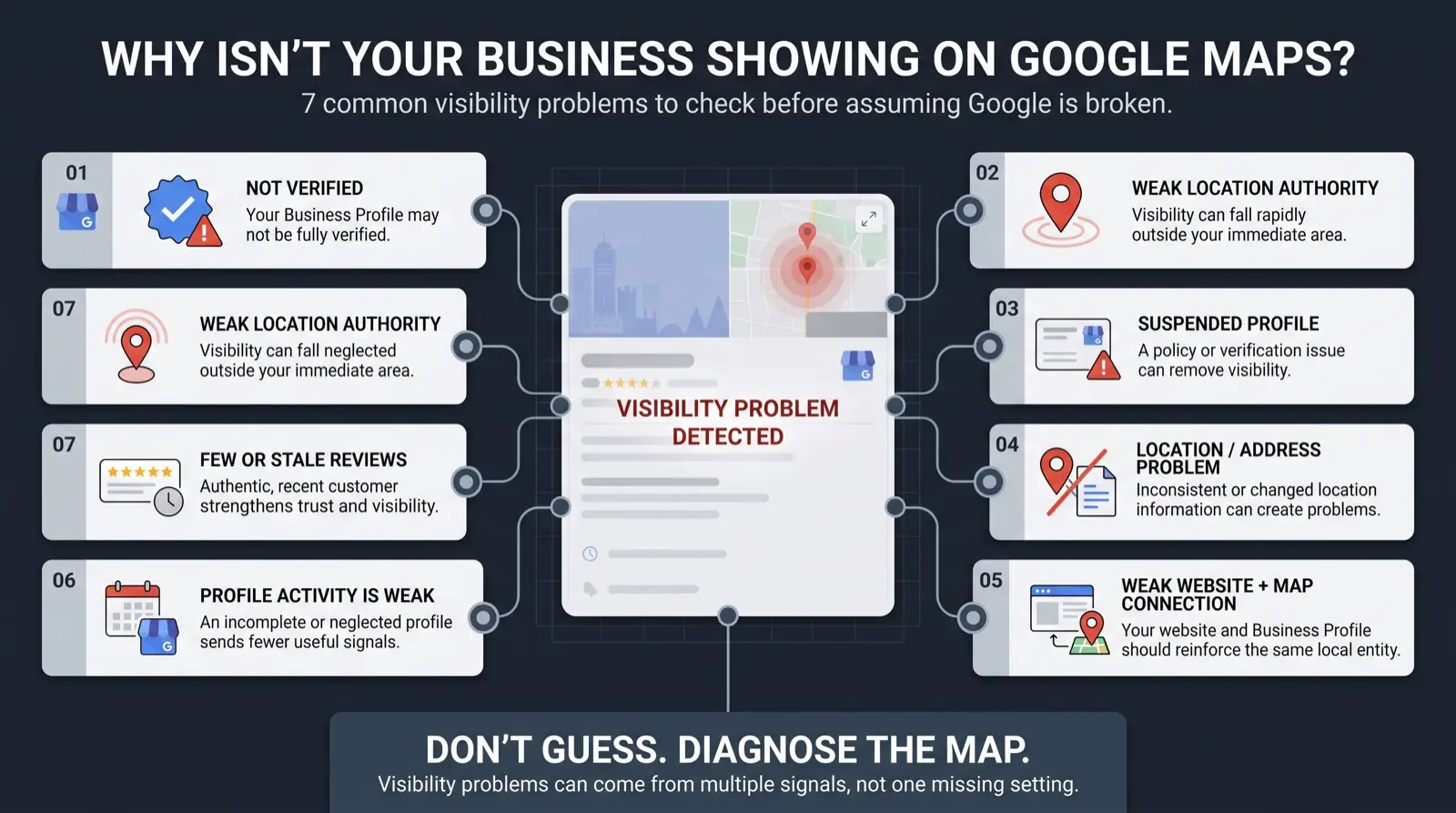
- Not verified, or stuck mid-verification. Covered above. Check the verification status before assuming anything else is the cause.
- Weak location authority. Google grants a business an area gradually, on proximity and consistent signals, not because the service-area field says so. More below.
- Suspended. A policy violation, a disputed edit, or a failed verification attempt can take a live profile down entirely. Suspended profiles do not rank low. They show nothing.
- Inconsistent business information. A different suite number on one directory, an old phone number on another. Google cross-checks the profile against the rest of the web, and conflicting answers read as a reason to trust the listing less.
- A website that does not reinforce the profile. No embedded map, no matching name, address, and phone in the site footer or schema, nothing tying the two together as one business.
- Stale posting and photo activity. A profile that looks the same as eight months ago reads as dormant. Freshness is a measured part of local ranking now, not a courtesy metric.3
- Few or stale reviews. Review signals are 20% of Local Pack weight in Whitespark’s 2026 survey, and a business with none in the last few months is read differently by customers than one with a steady trickle, even at the same star rating.3
- Verification status in the Business Profile dashboard. Stuck or unverified stops here.
- Suspension notices in the dashboard and in the account email.
- The primary category and whether the profile is set to a real address or a service area.
- Whether the name, address, and phone match exactly across the site, the profile, and the top directories.
- Confirm the profile is verified and not suspended. Nothing else matters until it is.
- Get the core fields right: category, services, hours, address or service area, description.
- Build the evidence around it: matching website, accurate citations, a steady flow of reviews.
- Re-measure against a baseline with a geo-grid scan instead of guessing whether it worked.
- Most owners check their rank from their own address, the single most flattering point.
- Distance is one of the two strongest ranking factors, by a wide margin.
- Past a certain distance a weak profile stops appearing, which reads as “invisible” not “ranked 39th”.
- You widen the radius with evidence of real work across the area, not a bigger service-area setting.
Fixing it is a sequence, not a single trick
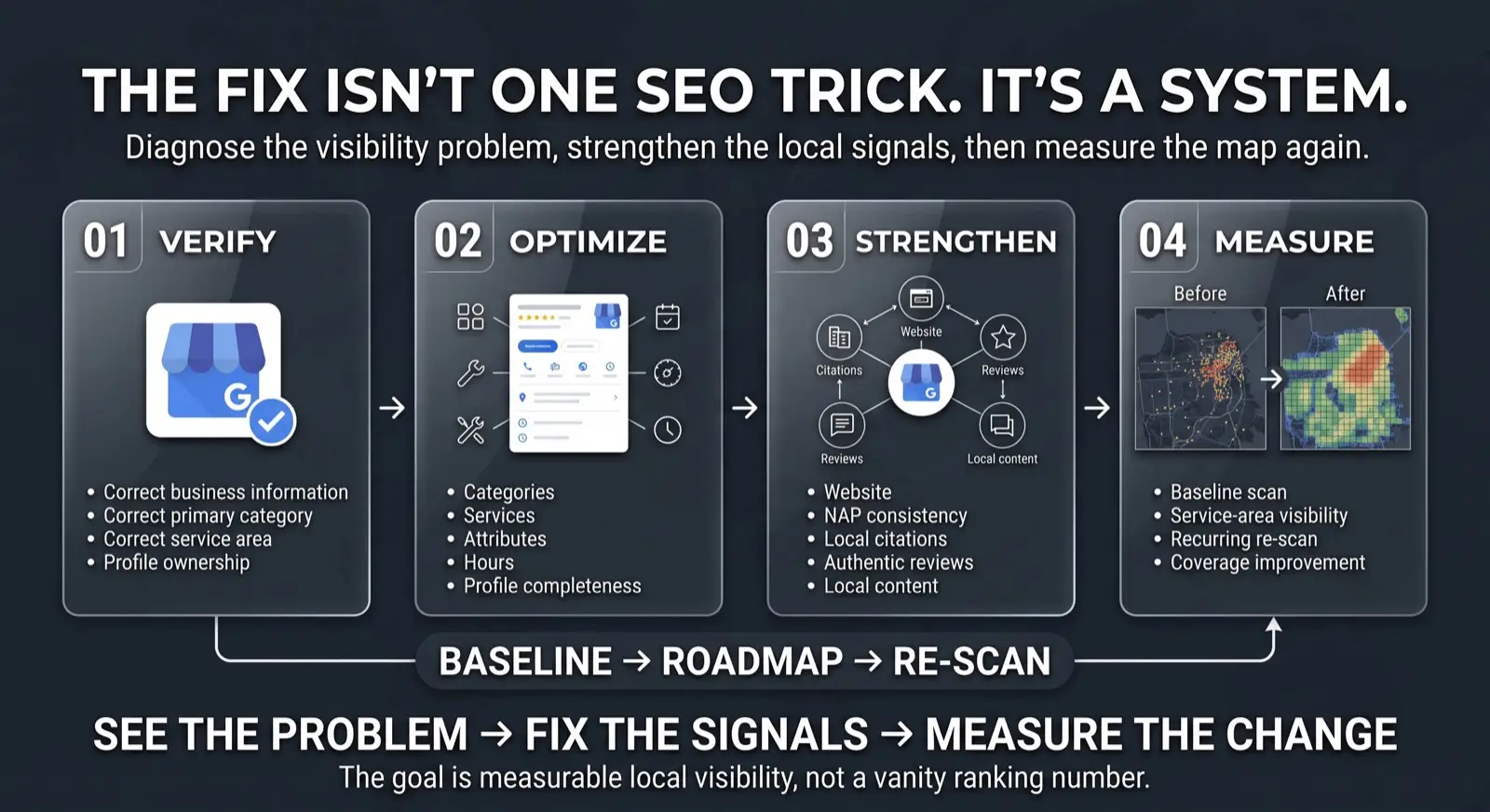
None of the seven get fixed by picking one and hammering on it. A verified profile with no reviews is still weak. A profile full of reviews that is not verified does not show up at all. The sequence is what makes each step pay off: confirm the profile is real and unblocked, get the core fields right, build the evidence around it, then re-measure against a baseline instead of guessing.
The one nobody thinks to check: location authority
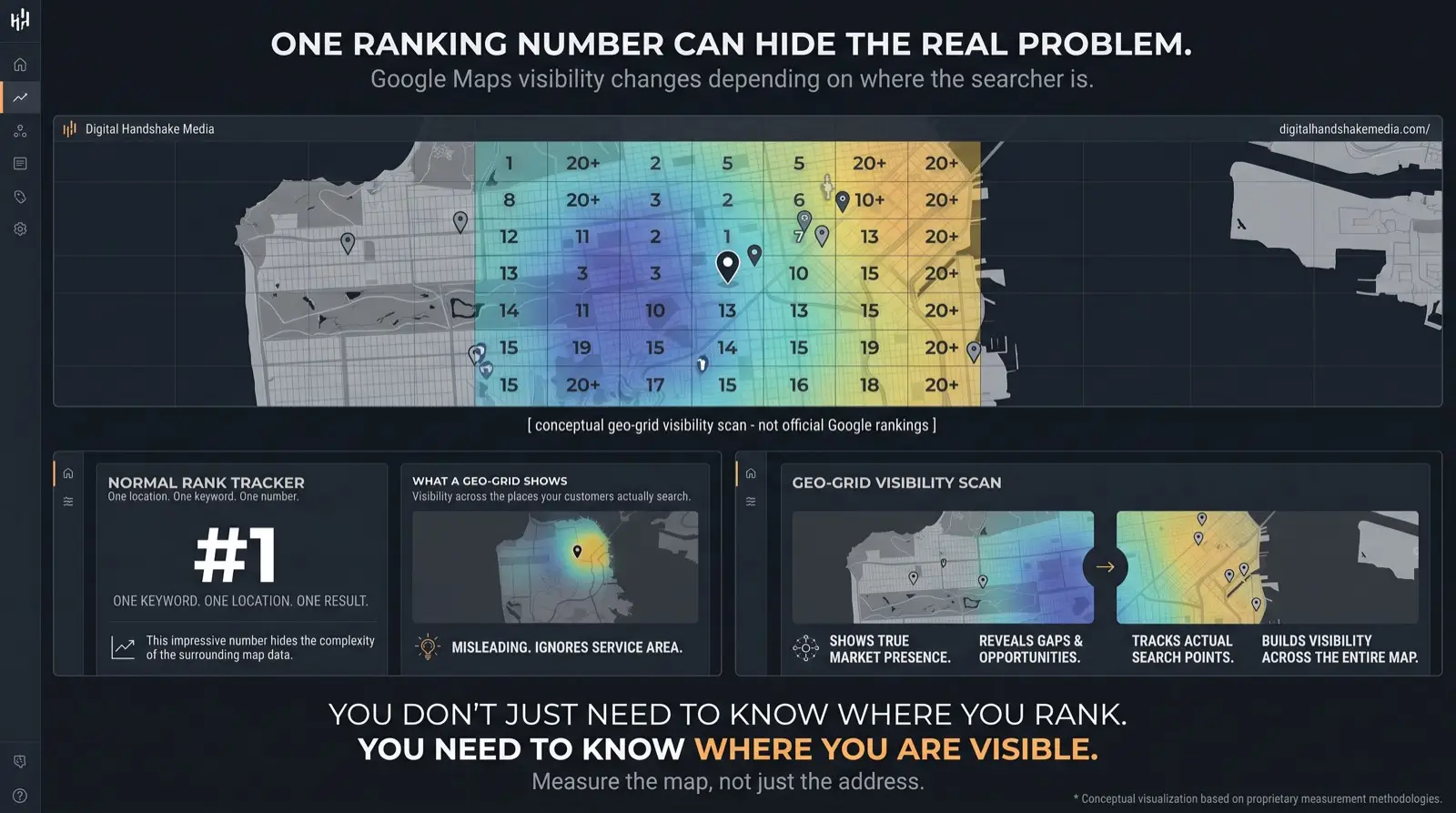
Most owners check their ranking from their own office, where distance to the searcher is at its smallest possible value. That is close to a best case, not a representative one. Distance is one of the two strongest factors in local ranking, by a wide margin over everything else.3 A profile with weak location authority does not just rank lower a few blocks over. Past a certain distance it can stop appearing at all, which reads to the owner as “invisible” rather than “ranked 39th,” because nobody scrolls that far to find out which one it is.
Location authority builds the way trust builds anywhere: consistently, through evidence Google can verify, not through a wider service-area radius typed into a form. That is the mechanism behind Map Check-Ins, which turns a crew’s completed jobs into dated, mapped records instead of asking Google to take a claimed radius on faith.
By the numbers
By the numbers
- GOOGLE DOCUMENTED Google assigns the verification method automatically and recommends video verification for eligible businesses; the video must be live, unedited, and at least 30 seconds.
- GOOGLE DOCUMENTED A suspended profile is removed from Search and Maps entirely until reinstated. It does not rank low; it does not appear.
- INDEPENDENT RESEARCH In Whitespark’s 2026 survey, distance is one of the two strongest Local Pack factors, and review rating and volume both rank in Whitespark's 2026 Local Pack top ten.
- DHM INTERPRETATION Absence and low ranking are different problems. Absence is a policy gate or an evidence gap, both of which a real business can close; there is no shortcut past either.
Find your reason
Which of the seven sounds like yours?
Pick the one closest to your situation.
Verification, suspension, or I’m not sure
Something structural is likely blocking the profile outright. Run the free check and see exactly what’s set and what isn’t.
Check your profile › Reason 04–05Inconsistent info, or a weak website connection
The profile exists but nothing else on the web backs it up. Get a free hand-run audit of where it disagrees with itself.
Get a free Map Pack audit › Reason 06–07Stale activity, or thin reviews
The profile is set up correctly but looks dormant. See how an automated proof layer keeps it visibly active.
See Map Check-Ins ›The honest part
Fixing all seven does not guarantee a ranking, and it treats a different problem than ranking position does: it gets a real, eligible business back to where Google is willing to show it at all. Google’s own guidance is direct: there is no way to request or pay for a better local ranking, on this or any list.4 What the seven have in common is that each is either a Google policy gate or an evidence gap, both things a real business can close, rather than a shortcut that works until it doesn’t.
Talk to someone about it Get the free scan instead
Why does my business not show on Google Maps at all, even by name?
That is absence, not low ranking, and it usually means something structural: the profile is unverified or stuck mid-verification, it has been suspended, or its information conflicts badly with the rest of the web. Check verification and suspension status in the Business Profile dashboard first. Review-building and content work cannot fix a listing Google will not display.
How is a Google Business Profile verified in 2026?
Google assigns the method automatically: phone, email, a live video call, or mail. For businesses that qualify it recommends video verification, which must be a live, unedited walkthrough of the location, at least 30 seconds, recorded and uploaded from a mobile device. A mailed postcard is no longer the default.
Can a suspended Google Business Profile still rank?
No. A suspended profile is removed from Search and Maps until it is reinstated. It does not appear at a low position; it does not appear at all. If your listing vanished suddenly, check the dashboard and the account email for a suspension notice before assuming a ranking problem.
Does inconsistent business information really keep me off the map?
It can. Google cross-checks your profile against your website and the major directories. A different suite number here, an old phone number there, and the conflicting answers read as a reason to trust the listing less. Make the name, address, and phone identical everywhere, then fix the largest directories first.
How do I widen the area my business appears in?
Not by increasing the service-area radius in the settings. Google grants a wider area on evidence that you genuinely work there: dated, location-specific records of real jobs, citations that name those places, and an active profile. A geo-grid scan shows the current radius and whether the work is extending it.
Sources
- Google Business Profile Help, Verify your business on Google: verification methods, assigned automatically, video recommended where eligible.
- Google Business Profile Help, Verify your business with a video recording: live, unedited recording requirements.
- Whitespark, Local Search Ranking Factors (2026 edition): distance ranked second among individual Local Pack factors; review signals 20% of Local Pack weight.
- Google Business Profile Help, Improve your local ranking on Google: there is no way to request or pay for a better local ranking.
- Peer-reviewed: Liang, Y., Gao, S., Cai, Y., Foutz, N. Z., & Wu, L. (2020). “Calibrating the dynamic Huff model for business analysis using location big data.” Transactions in GIS 24(3), 681–703. doi:10.1111/tgis.12624. Mobile-phone store-visit data from the 10 most populated US cities: store choice depends on distance and on a location’s draw, and how much distance matters varies by business type and city. Not about Google.
Figures are quoted from the published sources above and are directional. Google does not disclose its own local ranking weights.
Next step
Find out exactly what’s blocking your profile, not just that something is
One client per industry, per area. The call starts with an availability check, not a pitch.