
Map Check-Ins
Built exclusively for field-service trades: plumbers, roofers, HVAC, electricians & more
You did the work.
Now show it.
Your crew is already working across your service area, but most of that proof disappears when the truck leaves the driveway. The customer saw the job. Your crew saw the job. Map Check-Ins turns the work you already did into a dated, mapped record customers can actually see.
-
Real jobs onlyEvery check-in starts with work your crew actually completed.
-
Real locationsEach job is tied to where the work actually happened.
-
Real proofPhotos, dates and job details create a record of the work.
Read the transcript
Your crew is already doing the work, but once the truck leaves, most of that proof disappears.
Map Check-Ins changes that. Every completed job becomes a documented location, date and photo.
That proof becomes a live map on your website, with eligible updates to your Google Business Profile and connected channels.
So instead of simply claiming you serve an area, you can show the real work you are doing there.
Want to see where your Google Business Profile stands? Request your free GBP audit.

$299/mo · No long-term contracts
Watch how it works
Sixty seconds: a finished job becomes proof Google can read.
Your trucks cover the whole town. Google still boxes you in around your shop, because it only counts what it can read online. Map Check-Ins turns each completed job into a labelled record, the job, the day, the street, that Google, ChatGPT, Gemini and Perplexity can all read. Each job is more proof in that neighbourhood, so the circle grows to fit the work you already do.
Read the transcript
Your trucks cover the whole town. Google still boxes you in around your shop. Google cannot ride in the truck. It only counts what it reads online.
The business beating you is not better. It just leaves a trail online. You do not. You cannot pay Google for a bigger circle. You can feed it proof.
Map Check-Ins turns a finished job into proof Google can read. Your technician snaps a photo and picks the job in under a minute. Then a real person checks it before it goes out. It gets a label a machine understands: the job, the day, the street.
Now Google reads it, and so do ChatGPT, Gemini and Perplexity. Each job is more proof in that neighbourhood. The circle grows to fit your real work.
Job done, the customer gets a text to leave a Google review. Neighbours see your work down the street. One business per trade, per town. You already do the work. We help you keep the proof.
The Geographic Proof Gap
Why being #1 on Google Maps from your office doesn’t mean you’re winning your service area, and what to check this week before you spend another dollar. A 21-page field guide, sourced from Google’s own local-ranking documentation.
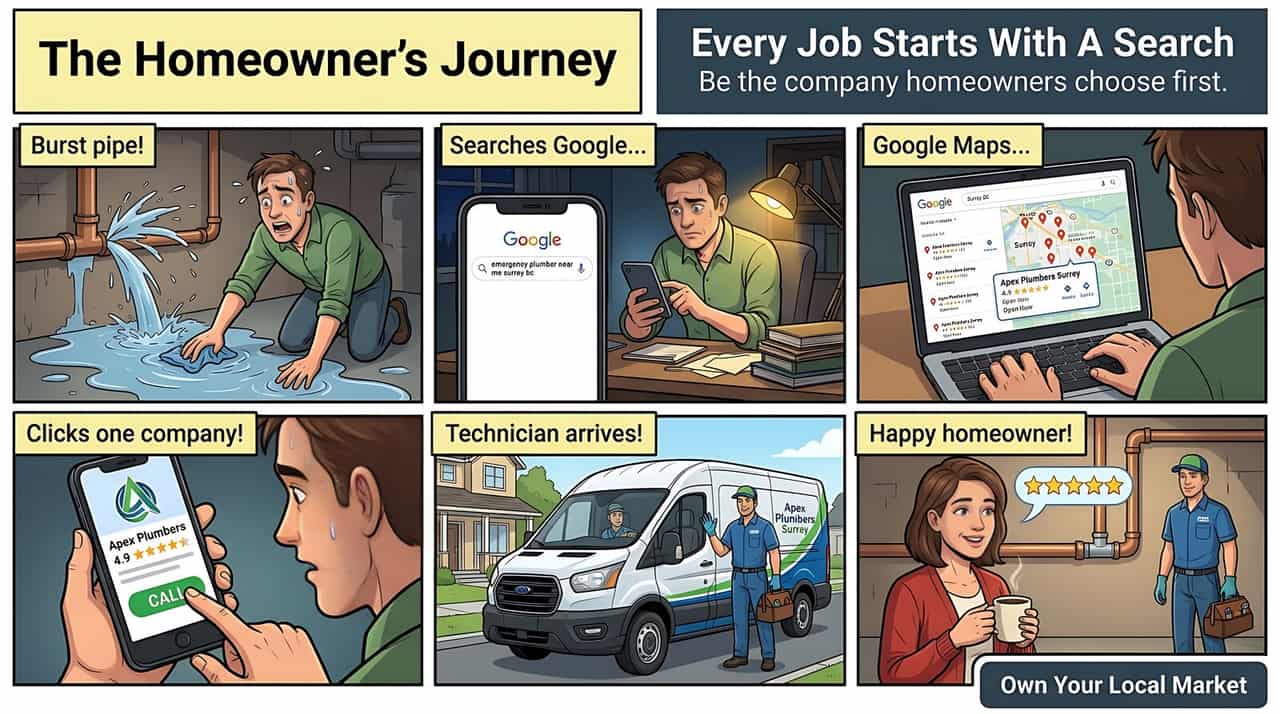
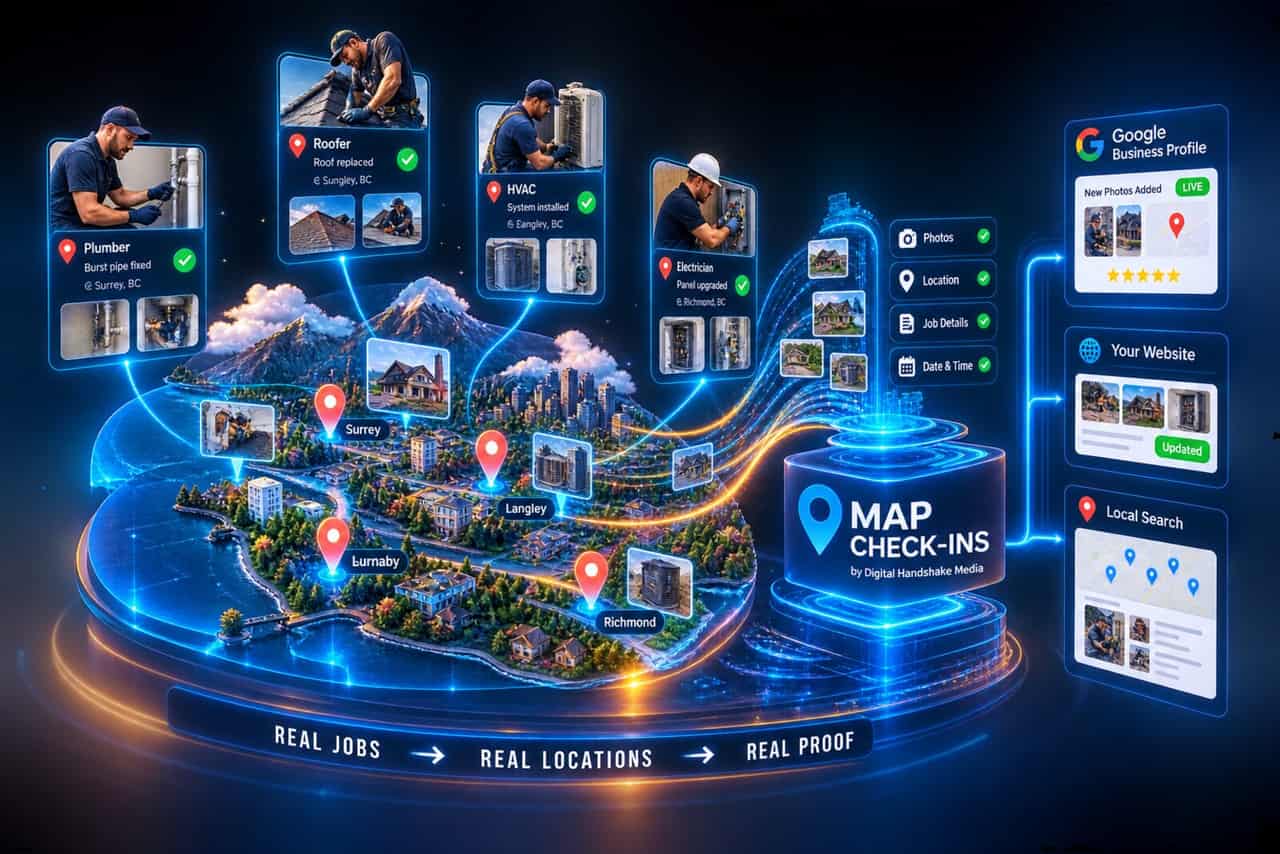
Map Check-Ins is a productized local-visibility system for service businesses. Every completed job gets logged with a location, a date, and photos in a client dashboard, and that record becomes a pin on an interactive map on your website, a post pushed to your Google Business Profile, and activity on any social channels you connect. It runs at $299 a month with a $250 one-time setup fee (waived for new clients), no long-term contract. It is a proof layer, not a ranking guarantee. Nothing legitimate can promise a specific Google Maps position, and we do not.
In plain English
Map Check-Ins is the receipt, not the lottery ticket.
You cannot hand Google a receipt and demand first place. Local rankings run on relevance, distance and prominence. Google names those three factors itself, and says plainly that “there’s no way to request or pay for a better local ranking.” Map Check-Ins does not try to get around that. It gives your broader Local SEO strategy better documentation of the legitimate work your business is actually doing.
Think of it as the referee and the scorekeeper. Google is the referee: it decides where you rank, using factors it has published and none it sells. Map Check-Ins is the scorekeeper: it turns real completed jobs into an organized, dated record, so there is more genuine evidence for your local visibility strategy to work with. You do the work. We help document the work. Google decides where you rank.


Your crews are already creating the proof. It disappears after the invoice.
Every day, a service business completes real work in real neighborhoods. The customer sees the finished job. The crew sees it. The invoice gets sent and paid. Then it disappears. The website stays exactly as static as it was that morning, the Business Profile does not change, and the next homeowner three streets over has no way of knowing you were just there.
Meanwhile the business is physically working all over its service area, but much of that evidence stays trapped inside invoices, dispatch software and camera rolls instead of becoming useful, public-facing business information. That is the actual gap: the work is happening, the proof of it is not.
A plumber fixes a burst pipe in Surrey. A roofer replaces a roof in Langley. An HVAC company installs a system in Burnaby. An electrician upgrades a panel in Richmond. Real businesses, real customers, real jobs, real locations. Then the invoice goes to accounting, the photos sit in someone’s camera roll, and the website says exactly what it said the week before.
The difference, side by side
With it, and without it
Same business. Same crew. Same jobs. The only difference is whether the work gets recorded.
Without Map Check-Ins
- Every finished job dies in the invoice. Nothing about it goes online.
- Your profile looks quiet. The last photo is from spring.
- A competitor with worse reviews looks busier than you, because they post and you do not.
- You cannot see your own coverage. You find out you are invisible when a regular says “I could not find you.”
With Map Check-Ins
- Every finished job becomes a dated pin in the neighbourhood it happened in.
- Your profile shows real, recent work. It reads as a business that is clearly active now.
- Google gets current, first-hand facts about where you work, in a form it can actually use.
- You can watch your map fill in, and see the gaps where you never get called.
From finished job to visible proof.
Map Check-Ins is not a ranking hack, a geotagging trick, or an AI shortcut. It is a repeatable way to turn work you already did into a documented record that builds trust and shows customers where you actually serve.
- 100% based on real work you actually completed
- Creates location signals Google can understand
- Builds trust with photos, maps, and real details
- Strengthens your presence across your entire service area

The difference
Not another report. A record of the work itself.
| Traditional local marketing | Map Check-Ins |
|---|---|
| Content gets written because something needs to be posted | Content originates from a job your crew actually completed |
| A monthly report tells you what happened | A dated map record shows what happened, block by block |
| Your Business Profile changes when someone remembers to update it | Your Business Profile can receive an update every time a job closes |
| Service-area coverage is a claim on a page | Service-area coverage is a set of dated pins on a map |

Logging a job, pinning it on your map and updating your website happen automatically the moment a job is marked complete. Automated review-request sending works the same way once your Google Business Profile is connected. The one thing that still isn’t automatic is a direct trigger from your CRM (ServiceTitan, Jobber, Housecall Pro), which is custom development, scoped per business.
One field check-in. Three layers of online proof.
The live work map
Turns your finished jobs into pins on a live website map.
Why it works
- Show real work: Prove exactly where your crews are active.
- Clear service areas: Turn abstract claims into a visual map.
- Permanent proof: Save every job so it keeps selling for you.
- Instant trust: Show neighbors you are already on their street.
Auto-post everywhere
Pushes your job photos and updates to your pages the second you finish.
Connected channels
- Google Business Profile
- YouTube Shorts
Channels light up once they are actively connected. Until then, this shows as available through supported integrations.
Instant requests
Sends a review invite to the customer the moment your truck leaves.
Why it works
- Perfect timing: Asks for the review while the work is fresh.
- Smart details: Mentions the exact job so the review is specific.
- AI assistance: Optional AI drafts quick, smart replies for you.
- 100% honest: Built for real customer feedback. Zero fake reviews.
Available once your Google Business Profile is connected to your dashboard.
Six things that start moving once you sign up.

Simple job check-ins
Real jobs mapped to real neighborhoods.

Google Business Profile updates
Fresh photos and activity that build trust.

Website proof that converts
Proper pages that help win more jobs.

Service area visibility
Stronger presence across the areas you serve.

Trust that compounds
More proof today means more business tomorrow.

Monthly reporting
Track growth and measure visibility.
Step by step
What actually happens
 01
01
You do the work
Your crew completes real work at a real address.
 02
02
Capture the proof
A location, a date and a photo go into your Map Check-Ins dashboard.
 03
03
We document it
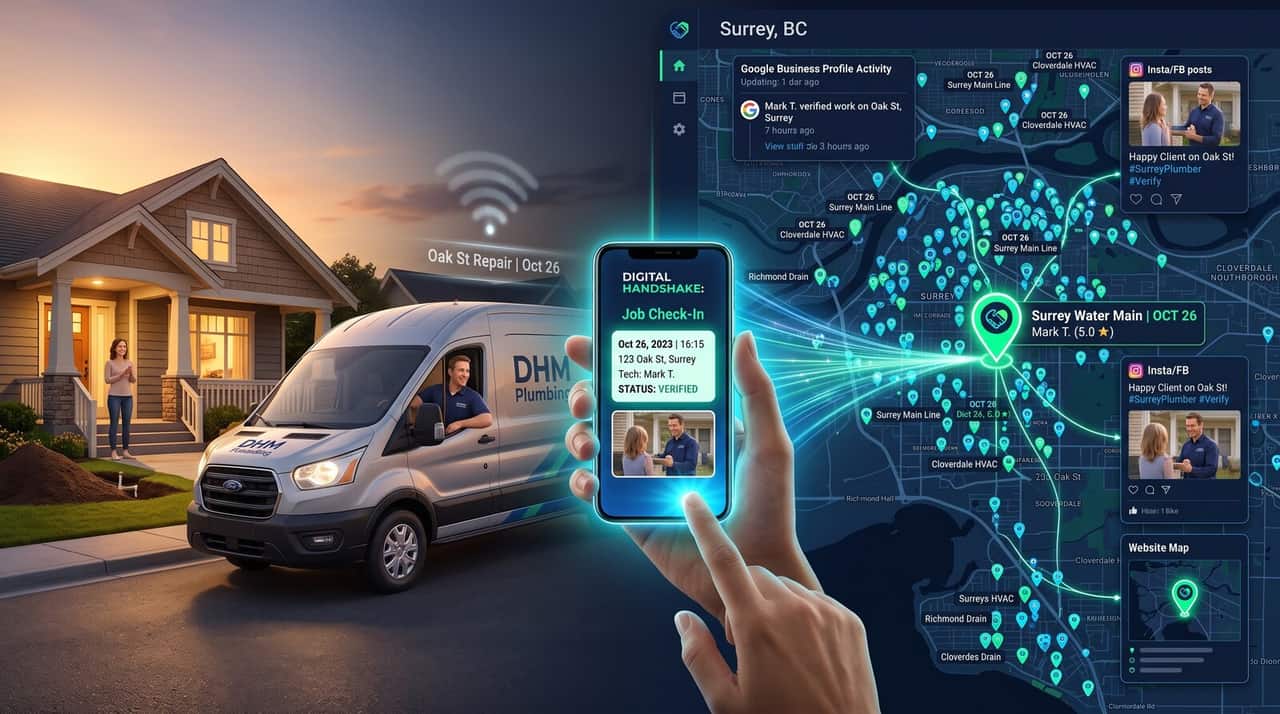
We turn it into a dated, location-aware record tied to your business.
It shows up
On your map, your profile, and any channels you have connected.
Real jobs only. No exceptions.
Map Check-Ins documents real completed work. It does not manufacture activity. If a month has no completed jobs, that month gets no check-ins, not a filler post standing in for one. Historical jobs can be added where the underlying information is accurate and verifiable, but a check-in is never used to make old work look recent; dates reflect what actually happened. A paper trail only works if it is true.

Already run ServiceTitan, Jobber or Housecall Pro?
Out of the box, Map Check-Ins runs through its own dashboard: your crew logs a job there directly, no new mandatory workflow forced onto your dispatch software. If you want job completions in your existing CRM to trigger a check-in automatically, our development team can build that connection, once you grant the API access it needs. That is custom work scoped per business, not a one-click toggle, and we will tell you plainly if your specific setup makes it straightforward or not. See how we approach integrations generally →
Built on legitimate work
Real work. Real locations. Real documentation.
Map Check-Ins is built on the work you actually complete for real customers in real places. No shortcuts, no tricks, no fake activity. Just legitimate proof of your business in the neighborhoods you serve.

Service-area businesses that do the work.
The mechanism depends on real jobs at real addresses, so it fits field-service businesses best, not a fixed storefront with no service radius.
 Plumbers
 Roofers
 HVAC companies
 Electricians
 Landscapers
 Cleaning services
 And more…
HVAC
An emergency repair in one neighborhood this morning, an install across town this afternoon, each one a dated pin instead of an invoice nobody outside your office ever sees.
Plumbing
Heavy reliance on the Local Pack and on being seen as active nearby, right when someone is searching with a burst pipe in front of them.
Roofing
Before-and-after photos already exist on every job. Turning them into a mapped record is closer to free than most of what gets billed as content marketing.
Restoration
High-trust, high-urgency work where a customer researching you mid-emergency benefits from seeing recent, nearby activity.
Who this is not for
A fixed-location business that rarely sends anyone to a customer’s address, most retail and single-location businesses, for example, will get substantially less value here. The mechanism depends on real jobs at real, different addresses. If that is not how your business operates, we will tell you so on the call rather than sell you a product that will not help.
Other field-service businesses fit too. See the full list of industries we work with →

A check-in is a record, not a raw data dump.
Each completed job can carry: the service type, the job date, the service area, a location, job status, a short description, photos, optional project details, an optional customer-approved testimonial, an internal job ID, and its own publication and distribution status. Two of those are worth separating out:
What customers can see
The service, the date, a general location, photos and any customer-approved testimonial: the pieces meant to show up on your map, your website and your connected channels.
What you and we can see
The exact address, the internal job ID, and publication/distribution status: used to run the system and keep your records straight, not published.
For residential work specifically, the public map shows a generalized location rather than a customer’s exact address by default, enough to show real, dated activity in the right neighborhood without publishing where a specific homeowner lives. Commercial job locations can be shown more precisely where appropriate. If your business needs a different default, tell us before your first check-in goes live.
Straight answers
What Map Check-Ins does not do
- It does not guarantee a Google ranking. No legitimate product can. See why we don’t guarantee rankings.
- It does not write reviews for your customers. The customer stays the genuine author of their review. Where AI is involved, it drafts a request or helps you draft your own reply. It does not generate a customer’s words for them.
- It does not replace Google Maps SEO. It is a proof and content layer that sits alongside the core ranking work, not a substitute for it.
- It does not connect to your CRM automatically. That is custom development work, scoped to your software and requiring your API access.
- It does not rely on photo geotagging as a ranking trick. Google strips GPS metadata from photos on upload; that is not how this works, and we will not pretend otherwise. Full breakdown: the AI-SEO myth detector →

More proof. More trust. More business.
Homeowners choose businesses they can see, trust, and remember. Map Check-Ins turns your completed work into a digital footprint that attracts more of the right customers across your entire service area.

One flat fee. No long-term contract.
Map Check-Ins is priced as a focused product, not a full-service retainer. You are not buying another report; you are buying a system that turns work you are already doing into a record you and your customers can actually see.
- Job check-in workflow: location, date and photo, logged through your dashboard in a couple of taps
- A live, interactive map of completed jobs on your website
- Eligible Google Business Profile distribution
- A job activity dashboard and visibility archive of every check-in
- Review-request workflow, active once your Google Business Profile is connected
- Support, plus an optional custom integration assessment for connecting your CRM or additional channels once API access is granted
Map Check-Ins
$299 / month
Plus a $250 one-time setup fee, waived for new clients. No long-term contract. Cancel anytime.
Not sure yet?
Check your visibility before you add anything
If you have not run a baseline check on your Google Business Profile, that is the honest place to start, free, and it takes a few minutes. Run the free Map Pack Check →
What to actually track
We will not tell you “you’ll rank higher and get X leads”. Nobody can promise that truthfully. What we do track, and share with you:
The proof layer
Jobs recorded, check-ins published, geographic and service-area coverage, GBP and connected-channel distributions, review requests sent.
The Local SEO layer
Geo-grid visibility, Map Pack presence, keyword visibility, search impressions, calls and website leads, tracked through your broader Local SEO engagement, not this product alone.
One product, one input
Map Check-Ins is an activity and proof layer, not a lottery ticket. Ranking movement should be judged against your whole local visibility picture (profile, website, reputation and authority work included), not attributed to one product in isolation. We do not manufacture fake activity, and we do not guarantee a specific position.
In plain terms
Why Google limits your radius, and what a check-in actually does about it
Google will not show your business to a homeowner in the next town over, even five miles out, unless it has reason to believe you actually work there. Your shop address is in town A, so town B searches see the businesses based in town B. That is distance doing its job: it is one of the two strongest factors in the local pack, and Google is cautious about businesses claiming ground they cannot prove they cover.
A check-in does not override that or trick the algorithm. What it does is produce the kind of evidence Google can actually read: a dated, specific, structured record that a real job of a named type was completed at a real location, published on your own website and, where eligible, your Google Business Profile. It is proof, in the format machines parse, that you operate across the area. The photo’s GPS is stripped on upload and carries no weight; the readable record is the point. Do enough of that, consistently, and you give Google a reason to widen the radius it will show you in. No guarantee attached, because there is no honest one to give.
Before you spend a dollar
The market assessment: what a real check sounds like
A real expert does not open with a slide deck. They treat the first call as a market assessment and ask you specific, probing questions before they talk price:
- “What are the exact high-intent searches you want to win?” “Roofing contractor” behaves differently on the map than “emergency roof leak repair” or “metal roof installation”. They need to map the right keyword grid, not a generic one.
- “Can we look at your current visibility grid map?” A geo-grid shows exactly where you rank first and where you drop to fifteenth, so the boundaries of your current visibility are diagnosed before any money changes hands.
- “Who holds the map pack in the zones you want to expand into?” They audit the competition to see whether a zone is too contested to be worth it, or whether there is a gap your check-ins can realistically open.
- “What is your crew’s actual field workflow?” If your technicians will not take ten seconds to log a photo and a location before pulling away from the curb, the tool fails. That has to be checked, not assumed.
- “How far are you realistically willing to drive for a job?” There is no point ranking you in a town you refuse to send a truck to.
And if the grid analysis shows local search is not the actual bottleneck for your business, a real partner tells you that, and does not sell you the tool. We do.
Buyer’s checklist
20 questions to put to any check-in tool, including us
Print this. Ask every vendor. The answers separate a marketing partner from a software salesman.
App workflow and crew adoption
If your field crew will not use the app, the tool is wasted money.
How many steps does it take a crew to log a check-in on site?
Well under a minute from a phone: take the photo, add a short caption, confirm the location. If it took longer, crews would quietly stop, and the whole system depends on them doing it every job.
Does the app work offline?
In a dead zone the check-in should hold on the device and upload when signal returns, so nothing is lost on a rural job. We confirm the exact behaviour for your setup during onboarding.
Can each crew member or project manager have their own login?
Yes. Per-user access, not a shared master login, so you can see who is actually contributing records.
Do check-ins publish instantly, or is there a review step?
They are reviewed before they go public. A blurry photo or an untidy job site never reaches your customers. Nothing publishes on a hair trigger.
Website and technical integration
The records have to live on your site to build local authority, without breaking it.
How does the map get onto my website?
Our development team builds it into your existing site directly, not as a bolt-on iframe. Content on your own domain is worth more for search than content trapped in an embedded frame.
Will it slow down my mobile page speed?
The map loads lazily and does not block the page. Trades leads are mostly mobile, so a map that bogged the site down would defeat the purpose. Page speed is checked as part of setup.
Does it inject real Local Business schema?
Yes. Each record adds structured data to the page, so the location, date and service type become something Google reads directly, not just text a human sees.
Can I filter check-ins by service on specific landing pages?
Yes. Records are tagged by service, so a metal-roofing page streams only metal-roofing check-ins and a repair page only repairs. Each page shows the proof that matches it.
Google Business Profile and social syncing
Google is protective of its listings. Automated posting has to stay inside its terms.
Does it use official Google Business Profile tools, or workarounds?
Official tools only. No scraping, no unofficial integrations. The fastest way to get a profile suspended is a sketchy connection, and we are not risking your listing to save development time.
Does every check-in become a separate Google post?
No. Records are paced and formatted so the profile looks tended, not spammed. Five check-ins in one day do not turn into five near-identical posts.
Can I turn the Facebook and Instagram sync on or off?
Yes. Send records to Google and your website and keep social manual, or switch social on. Curating Instagram by hand is a legitimate choice.
Review generation workflow
Review rating and volume both rank in the Local Pack top ten, so the ask has to be built in.
What triggers the review request to the customer?
Marking the job complete. Not a dashboard someone has to remember to open days later. The moment the customer is happiest is the moment to ask.
Is the request sent by text or email?
Both are available; text is the default, because open and completion rates for residential work are far higher than email.
Does it take the customer straight to the Google review box?
Yes. One tap to the star box. Every extra click between the customer and the form loses reviews.
Contracts, competitors and reporting
This is where a marketing partner separates from a generic vendor.
Do you lock out my local competitors?
Yes. One client per industry, per area, across this whole business. We will not run this for two roofers competing on the same map.
Is there a long-term contract?
No. Month to month, cancel anytime. We put that in writing.
Is the $250 setup fee waived right now?
It is waived for new clients as standard. Ask when you book so it is on the record.
If I cancel, what happens to the pins and data on my site?
The historical records are yours. The live map stops updating, but the past records can be exported and remain your property. You never lose what you paid to build.
How is success measured, and do I get a live dashboard?
Geo-grid heat-map scans against a dated baseline, with direct access to the tracking. You watch your coverage change month over month, not read a formatted PDF.
Can you run a baseline market assessment before I sign?
Yes. The free assessment maps your current territory and the competitors holding it before you commit to anything. If the map says local search is not your bottleneck, we tell you.
Frequently asked questions
Does a check-in tool actually widen my Google Maps visibility radius?
Not directly, and not on its own. Distance from the searcher is one of the two strongest local ranking factors, and no tool overrides it. What a steady stream of dated, specific, structured job records does is give Google readable evidence that you operate across the area, which is what it needs before it will show you further out. It supports a wider radius over time; it does not command one.
What should an agency ask me before selling me a check-in tool?
Your high-intent search targets, a look at your current geo-grid visibility map, who holds the map pack in your target zones, your crew's real field workflow, and how far you will actually drive for a job. If they open with a price and a slide deck instead, that is the wrong vendor. A real one also tells you no when the grid shows local search is not your bottleneck.
Does Map Check-Ins inject schema markup into my website?
Yes. Each check-in record adds structured data to the page it sits on, so the location, date and service type are readable by Google directly rather than only as text. That is separate from, and does not depend on, photo GPS, which Google strips on upload.
What happens to my check-in data if I cancel?
It is yours. The live map stops updating and the widget switches off, but the historical records can be exported and the past data remains your property. Data ownership is not conditional on staying subscribed.
Will the map slow my website down?
It is built to load lazily and not block the page, and page speed is checked during setup. Trades leads are mostly mobile, so a map that dragged on load times would work against the whole point of the product.
What is Map Check-Ins, in one sentence?
A system that turns each completed job into a dated, mapped record on your website and your Google Business Profile, so real service activity becomes visible proof instead of disappearing after the invoice.
How much does it cost?
$299 per month, plus a one-time $250 setup fee that is waived for new clients. No long-term contract, cancel anytime.
Does Map Check-Ins guarantee better Google Maps rankings?
No. Nothing legitimate can guarantee a specific ranking, and we do not sell guarantees anywhere in this business. Map Check-Ins is a proof and visibility layer, not a ranking mechanism on its own.
Does this replace Local SEO or Google Maps SEO?
No. It complements that work. Map Check-Ins can stand alone as a product, but it is designed to sit alongside a broader Google Maps SEO engagement, not instead of one.
Can it connect to ServiceTitan, Jobber or Housecall Pro?
Not automatically out of the box. Our development team can build a custom connection so a job closed in your CRM triggers a check-in, but that requires your API access and is scoped per business.
Does it use GPS or geotagged photos to improve rankings?
No, and we would be misleading you if we said it did. Google strips GPS metadata from photos on upload, so a geotagged image carries no ranking weight by itself. The map record here works because it is structured, dated activity shown on your own site and profile, not because of hidden photo metadata.
Are the reviews real?
Yes. The customer is always the genuine author. Where AI assistance is used, it helps draft the request that goes out or helps you draft your own reply. It never writes the customer’s review for them.
Is there a contract?
No long-term contract. It runs month to month and you can cancel anytime.
Who is this actually for?
Field-service businesses whose crews complete jobs at different addresses across a service area: HVAC, plumbing, roofing, restoration, electrical, and similar trades. A fixed-location business with no service radius will not get much from it.
What exactly is a Map Check-In?
A structured record of one real completed job: its location, date, service type and supporting photos. That record can then show up on your website and, where connected, on eligible channels. It is not a native Google ranking mechanism; it is a paper trail for work you actually did.
Does a Map Check-In directly improve Google Maps rankings?
No, and we will not claim otherwise. Map Check-Ins does not control or guarantee a Google Maps ranking. Google’s own local ranking guidance names relevance, distance and prominence as the deciding factors, and states plainly that there is no way to request or pay for a better local ranking. What Map Check-Ins does is turn genuine completed work into structured, current proof of business activity that can support your broader local visibility strategy. It is the receipt, not the lottery ticket.
Does Google use the map pins as a ranking signal?
No. We do not claim that, because it is not something we can support. Their real value is in documenting genuine business activity on your own website and adding to the information Google already pulls from a business’s own website and other sources when it decides what it knows about a local business.
Does this help with AI search, AEO or GEO?
Indirectly, and only by doing the fundamentals well. Google’s current AI-search guidance says there is no separate technical layer required for AI visibility. It points back to the same basics: crawlable, useful, original, well-structured information. Map Check-Ins is built around producing exactly that kind of first-party information about real work in real places, not around any AI-specific trick.
Why not just post the jobs manually?
You can, and some businesses do. The problem is rarely knowing how to write a post. It is consistently doing it, job after job, without adding another task to someone’s week. Map Check-Ins is a repeatable workflow: job completed, job logged, location recorded, proof organized, website updated, eligible channels updated. The content originates from work you actually completed, not from someone in the office trying to remember to post something.
Is Map Check-Ins a Local SEO service?
No. It is a local visibility product that complements Local SEO. You can buy it on its own, but it is not a substitute for Google Maps SEO, website SEO, reputation management or the broader authority work a full Local SEO engagement covers.
Who should not buy Map Check-Ins?
A fixed-location business that rarely sends anyone to a customer’s address, most retail and single-location businesses, for example. The mechanism depends on real jobs at real, different addresses, so it is built for field-service trades. We will say so directly on the call rather than sell it to a business it will not help.
What happens in a month with no completed jobs?
That month gets no check-ins. Map Check-Ins documents real completed work; it does not manufacture activity to fill a schedule. A system built on genuine job records only works if every record in it is true.
Can you add a check-in for a job from months ago?
Yes, where the underlying information is accurate and verifiable, but the date reflects when the job actually happened. Historical check-ins are never used to make old work look recent.
Are job locations shown publicly?
For residential work, the public map shows a generalized location rather than a customer’s exact address by default, balancing real local proof against a customer’s privacy. Commercial job locations can be shown more precisely where appropriate.
What makes this different from a normal Google Business Profile posting service?
A normal posting service is post, publish, forget: content written because something needed to go up. Map Check-Ins has an operational source of truth: job, record, map, website, eligible distribution, archive. The difference is not posting more often. It is that every record traces back to a real job your business actually completed.
Sources
- Google Business Profile Help, “Local search ranking factors”, support.google.com: relevance, distance and prominence, and “there’s no way to request or pay for a better local ranking.”
- Google Business Profile Help, “Create and manage posts on your Business Profile”, support.google.com.
- Google Search Central, “Optimizing for AI features and your website” (AI-search optimization guide), developers.google.com, last updated July 2026.
- Whitespark, 2026 Local Search Ranking Factors Survey: Google Business Profile completeness and post activity as ranking signals.
Related
Where to go from here

Let’s get your first job on the map.
$299/month, $250 setup waived for new clients, no long-term contract.
Or call 778-200-8644 · One client per industry, per area · No guaranteed rankings